Interactive Grid
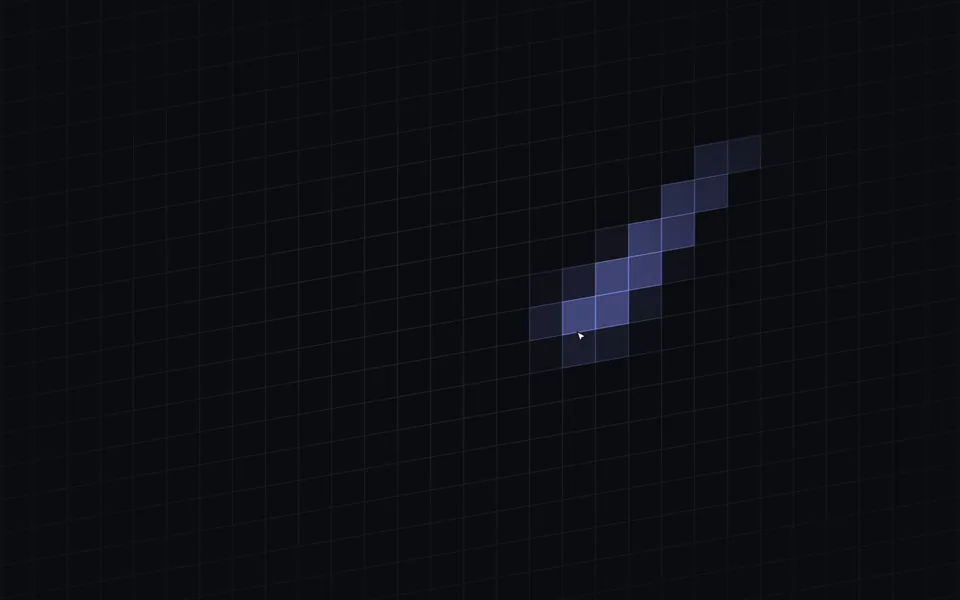
A fine-lined grid sits in the background; cells light up under the pointer and dim slowly, leaving a faint trail behind it. A backdrop for heroes, sign-in pages and developer tools.
- React · Canvas
- MIT
- magicuidesign/magicui
- Remix this
Loading preview
Tune
Highlighted lines hold your current values; copies and downloads include them
// SPDX-License-Identifier: MIT// Copyright (c) Magic UI// Source: https://github.com/magicuidesign/magicui/blob/d7207e5/apps/www/registry/magicui/interactive-grid-pattern.tsx// Modified by Motif; see the item's provenance.import { cn, useCanvasSize, useFrameLoop, usePrefersReducedMotion } from '@motif/runtime'import { useEffect, useRef, type CSSProperties, type ReactNode } from 'react'/* @motif:defaults */export const defaults = { cellSize: 44, skew: -10, lineColor: '#c7d2fe', lineOpacity: 0.14, fade: 0.7, highlightColor: '#818cf8', highlightOpacity: 0.45, brush: 1, trail: 1.5,}/* @motif:end */export type InteractiveGridProps = Partial<typeof defaults> & { className?: string style?: CSSProperties children?: ReactNode}/** 周围格子亮起所用的时间(秒),对应上游的 duration-100;指针正下方的格子立刻点亮。 */const ATTACK = 0.1/** 格子的列、行打包成一个整数键(各带 2^15 的偏移),用来在 Map 里只记录亮着的格子。 */const cellKey = (col: number, row: number) => (col + 32768) * 65536 + (row + 32768)const colOf = (key: number) => Math.floor(key / 65536) - 32768const rowOf = (key: number) => (key % 65536) - 32768/** * 一张细线网格,指针下的格子迅速亮起、慢慢暗下去。 * 网格坐标以容器中心为原点、以格为单位,格子 (c, r) 的中心在 (c, r);倾斜是绕中心的 skewY。 * 指针在整个窗口上监听,内容叠在网格上面也不会挡住它。尺寸由 className 决定,children 叠在网格之上。 */export function InteractiveGrid({ className, style, children, ...props }: InteractiveGridProps) { const options = { ...defaults, ...props } const optionsRef = useRef(options) optionsRef.current = options const reduced = usePrefersReducedMotion() const reducedRef = useRef(reduced) reducedRef.current = reduced const hostRef = useRef<HTMLDivElement>(null) const canvasRef = useRef<HTMLCanvasElement>(null) /** 亮着的格子的热度(0–1)。 */ const heat = useRef(new Map<number, number>()) /** 指针所在的格子;不在网格上时为 null。 */ const pointerCell = useRef<{ col: number; row: number } | null>(null) const size = useCanvasSize(canvasRef, { maxDpr: 2, onResize: () => drawRef.current() }) /** 指针所在格子及其周围按笔刷半径衰减的目标热度。用格心之间的距离,指针在格内移动时不会闪。 */ const litCells = (): [number, number][] => { const cell = pointerCell.current if (!cell) return [] const { brush } = optionsRef.current const reach = Math.ceil(brush) const lit: [number, number][] = [] for (let dc = -reach; dc <= reach; dc++) { for (let dr = -reach; dr <= reach; dr++) { const distance = Math.hypot(dc, dr) const strength = distance === 0 ? 1 : Math.max(0, 1 - distance / (brush + 1)) ** 1.5 if (strength > 0.02) lit.push([cellKey(cell.col + dc, cell.row + dr), strength]) } } return lit } const draw = () => { const canvas = canvasRef.current const ctx = canvas?.getContext('2d') if (!canvas || !ctx) return const { width, height, dpr } = size.current const o = optionsRef.current const cssWidth = width / dpr const cssHeight = height / dpr const s = Math.max(4, o.cellSize) const tan = Math.tan((o.skew * Math.PI) / 180) ctx.setTransform(1, 0, 0, 1, 0, 0) ctx.clearRect(0, 0, width, height) // 网格坐标 (x, y) → 屏幕 (x + w/2, y + x·tan + h/2),再乘像素比。 ctx.setTransform(dpr, dpr * tan, 0, dpr, (dpr * cssWidth) / 2, (dpr * cssHeight) / 2) // 亮着的格子:填充用 ease-in-out 后的热度,和上游的 transition 曲线一致;边框再亮一点,格子更清楚。 ctx.fillStyle = o.highlightColor ctx.strokeStyle = o.highlightColor ctx.lineWidth = 1 for (const [key, value] of heat.current) { const eased = value * value * (3 - 2 * value) const x = (colOf(key) - 0.5) * s const y = (rowOf(key) - 0.5) * s ctx.globalAlpha = eased * o.highlightOpacity ctx.fillRect(x, y, s, s) ctx.globalAlpha = eased * Math.min(1, o.highlightOpacity * 1.4) ctx.strokeRect(x, y, s, s) } // 网格线:只画覆盖画布的那一片(倾斜后上下要多铺一些)。 const halfWidth = cssWidth / 2 const halfHeight = cssHeight / 2 + Math.abs(halfWidth * tan) const c0 = Math.floor(-halfWidth / s - 0.5) const c1 = Math.ceil(halfWidth / s + 0.5) const r0 = Math.floor(-halfHeight / s - 0.5) const r1 = Math.ceil(halfHeight / s + 0.5) ctx.globalAlpha = o.lineOpacity ctx.strokeStyle = o.lineColor ctx.beginPath() for (let c = c0; c <= c1; c++) { ctx.moveTo((c + 0.5) * s, (r0 - 0.5) * s) ctx.lineTo((c + 0.5) * s, (r1 + 0.5) * s) } for (let r = r0; r <= r1; r++) { ctx.moveTo((c0 - 0.5) * s, (r + 0.5) * s) ctx.lineTo((c1 + 0.5) * s, (r + 0.5) * s) } ctx.stroke() ctx.globalAlpha = 1 } const drawRef = useRef(draw) drawRef.current = draw /** 减少动态效果时没有余晖:只亮指针下的格子,立刻画出来。 */ const showInstantly = () => { heat.current = new Map(litCells()) drawRef.current() } const showInstantlyRef = useRef(showInstantly) showInstantlyRef.current = showInstantly useEffect(() => { const host = hostRef.current if (!host) return const onMove = (event: PointerEvent) => { const rect = host.getBoundingClientRect() const x = event.clientX - rect.left const y = event.clientY - rect.top if (x < 0 || y < 0 || x > rect.width || y > rect.height) { pointerCell.current = null } else { const o = optionsRef.current const s = Math.max(4, o.cellSize) const gx = x - rect.width / 2 const gy = y - rect.height / 2 - gx * Math.tan((o.skew * Math.PI) / 180) const cell = { col: Math.round(gx / s), row: Math.round(gy / s) } const previous = pointerCell.current pointerCell.current = cell // 指针下的这一格立刻点亮并马上重画,高亮不会落后指针一格;周围的格子和余晖仍由帧循环渐变。 heat.current.set(cellKey(cell.col, cell.row), 1) if (!reducedRef.current && (previous?.col !== cell.col || previous?.row !== cell.row)) drawRef.current() } if (reducedRef.current) showInstantlyRef.current() } const onLeave = () => { pointerCell.current = null if (reducedRef.current) showInstantlyRef.current() } window.addEventListener('pointermove', onMove, { passive: true }) document.documentElement.addEventListener('pointerleave', onLeave) return () => { window.removeEventListener('pointermove', onMove) document.documentElement.removeEventListener('pointerleave', onLeave) } }, []) // 格子大小或倾斜变了,旧的格子坐标就对不上了:清空热度重画。参数变化在静止状态下也要重画。 useEffect(() => { heat.current.clear() pointerCell.current = null drawRef.current() }, [options.cellSize, options.skew]) useEffect(() => drawRef.current(), [options.lineColor, options.lineOpacity, options.highlightColor, options.highlightOpacity]) const step = (delta: number) => { if (delta > 0) { const map = heat.current const decay = delta / Math.max(0.05, optionsRef.current.trail) for (const [key, value] of map) { const next = value - decay if (next <= 0) map.delete(key) else map.set(key, next) } const rise = delta / ATTACK + decay for (const [key, target] of litCells()) { const value = map.get(key) ?? 0 if (value < target) map.set(key, Math.min(target, value + rise)) } } draw() } useFrameLoop(hostRef, ({ delta }) => step(delta), { reducedMotion: 'static', staticTime: 0 }) const mask = options.fade > 0 ? `radial-gradient(ellipse 50% 50% at 50% 50%, #000 ${Math.round((1 - options.fade) * 100)}%, rgb(0 0 0 / ${(1 - options.fade).toFixed(2)}) 100%)` : undefined return ( <div ref={hostRef} className={cn('relative isolate overflow-hidden', className)} style={style}> <canvas ref={canvasRef} aria-hidden className="pointer-events-none absolute inset-0 block size-full" style={{ maskImage: mask, WebkitMaskImage: mask }} /> {children && <div className="relative z-10 h-full w-full">{children}</div>} </div> )}